All new Providers, Therapist, or any user seeing patients or clients for Virtual Visits will need account set up.
To add a new user:
Create new case in Success Communities
*Virtual Visits
*Subject Add new user (P
*Attach completed "Virtual Visit User Enrollment" (See attached form)
*Ticket will be updated once email is sent to new user
*Once email is sent the link will expire after 7 days
Once email received, assist user with setting up account
*Review account settings
*Remove email notifications for scheduled appointments
*Remove email notifications for cancelled appointments
*Add provider picture to account. Submit ticket to IT to email picture used for badge.
*Save OTTO link to favorites
To Deactivate a user:
Create a new case in Success Communities
*Virtual Visits
*Subject - Deactivate user
*In comments section add users first and last name, inform they are no longer employed with SIHC. Request updated active user list and update here.
*Ticket will be updated once information is updated
Information for providers:
*Email video link that they can use for training materials
https://www.ottohealth.com/nextgen-training-materials-*t85B3K4qAEi
*Send below workflows to new users.
Video Ready review with Provider / Therapist (See attachment for Provider and BH Video ready)
*Train new provider using NextGen Workflows located in NextGen workflows.
OTTOHealth Troubleshooting Connection Guide
*Use to assist patients connecting their devices if issues arise.
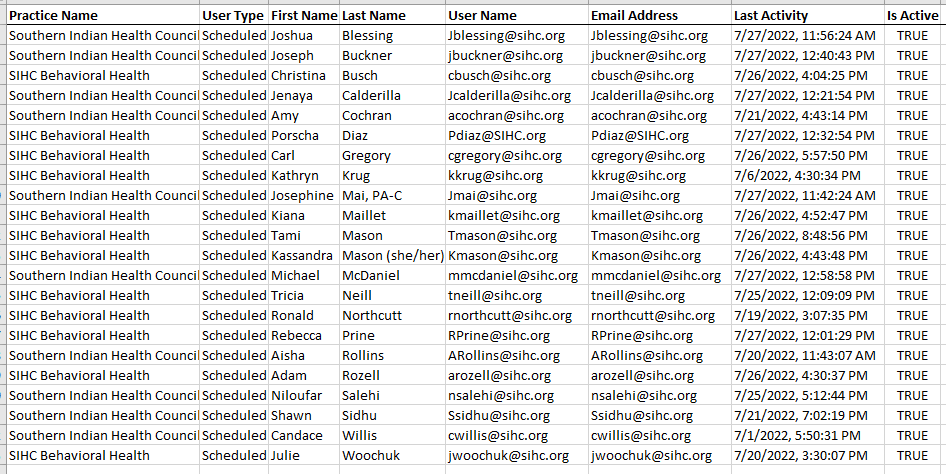
ACTIVE LIST as of 07-27-2022
Total of 22 active users, and 4 unused licenses.
SIHC has a total of 26 licenses

Was this article helpful?
That’s Great!
Thank you for your feedback
Sorry! We couldn't be helpful
Thank you for your feedback
Feedback sent
We appreciate your effort and will try to fix the article